
Every day, buyers ask AI assistants which product to pick, whether a brand is legitimate, and what the alternatives are. The engines answer in confident prose: they name a shortlist, make factual claims, and often cite the pages those claims came from. All of that happens whether or not you are watching, and none of it shows up in your analytics.
AI brand monitoring is the discipline of watching it deliberately. This guide covers what it is, why it is suddenly a baseline marketing task, how it differs from the social listening you may already run, exactly what to track, and a setup that takes minutes rather than becoming a standing chore. The setup is also on video: a four-minute, step-by-step tutorial on a real brand.
What AI brand monitoring is
AI brand monitoring means systematically recording how AI answer engines respond to the questions your buyers ask, and how those responses treat your brand. In practice that is a fixed set of prompts, the buyer questions that matter to you, run on a schedule across the engines your customers actually use: ChatGPT, Perplexity, Gemini, Claude, Grok, Google AI Overviews and Google AI Mode.
Each run records whether your brand was named, what was said about it, which rivals appeared, and which sources the engine cited. Over time those runs become a trend: your AI share of voice, rising or falling against the competitors the engines keep naming beside you.

Why it matters now
Three shifts pushed this from curiosity to baseline. First, volume: a meaningful share of product research now starts in an assistant instead of a search box, and our AI search statistics roundup collects the sourced numbers behind that shift. Second, concentration: an AI answer names a handful of brands where a results page listed ten blue links, so being left out is closer to invisibility than ranking on page two ever was. Third, authority: an assistant answers in a neutral, factual register, and buyers rarely see the sources behind it, so a wrong or stale claim reads as truth.
The engines also disagree with each other and change their minds. In our own daily scans, the same buyer question can produce different shortlists on different engines, and the answers change run to run, with model updates, and as the web moves. Whatever you saw when you last checked by hand is already old.
Monitoring answers is not social listening
If you already run social listening, the instinct is to treat AI as one more channel in that dashboard. It does not work, because the two watch different things.
| Social listening | AI brand monitoring | |
|---|---|---|
| What it watches | Public posts by people | Generated answers by machines |
| Where the data lives | Feeds and APIs you can subscribe to | Nowhere: answers exist only when asked |
| Unit of measure | Mentions and sentiment over time | Presence, position, claims and citations per question |
| Who sees it | Whoever follows the account or hashtag | The buyer who asked, privately |
| How you fix a problem | Engage, respond, escalate | Fix your site and the third-party sources engines cite |
Both are worth running. Only one of them sees what an assistant privately tells a buyer about you.
The practical consequence: there is nothing to passively collect. Monitoring AI answers means asking the questions yourself, the same ones, consistently, and keeping the receipts.
The five things to watch
A useful monitoring setup records five things for every tracked question, every run:
1. Presence. Were you named at all? Absence from the shortlist is the single most expensive outcome, and the causes are diagnosable: our guide to why a brand does not show up in AI search walks the checklist.
2. Position. First brand named and last brand named are different outcomes. Engines order their shortlists, and buyers read them in order, so track where in the answer you appear, not just whether.
3. Claims. What does the answer actually say about you? Pricing, features, positioning and comparisons all get asserted, sometimes wrongly, and a wrong claim delivered in the engine’s neutral voice does quiet damage. Cross-checking answers against your own site’s facts is what a brand-safety check automates.
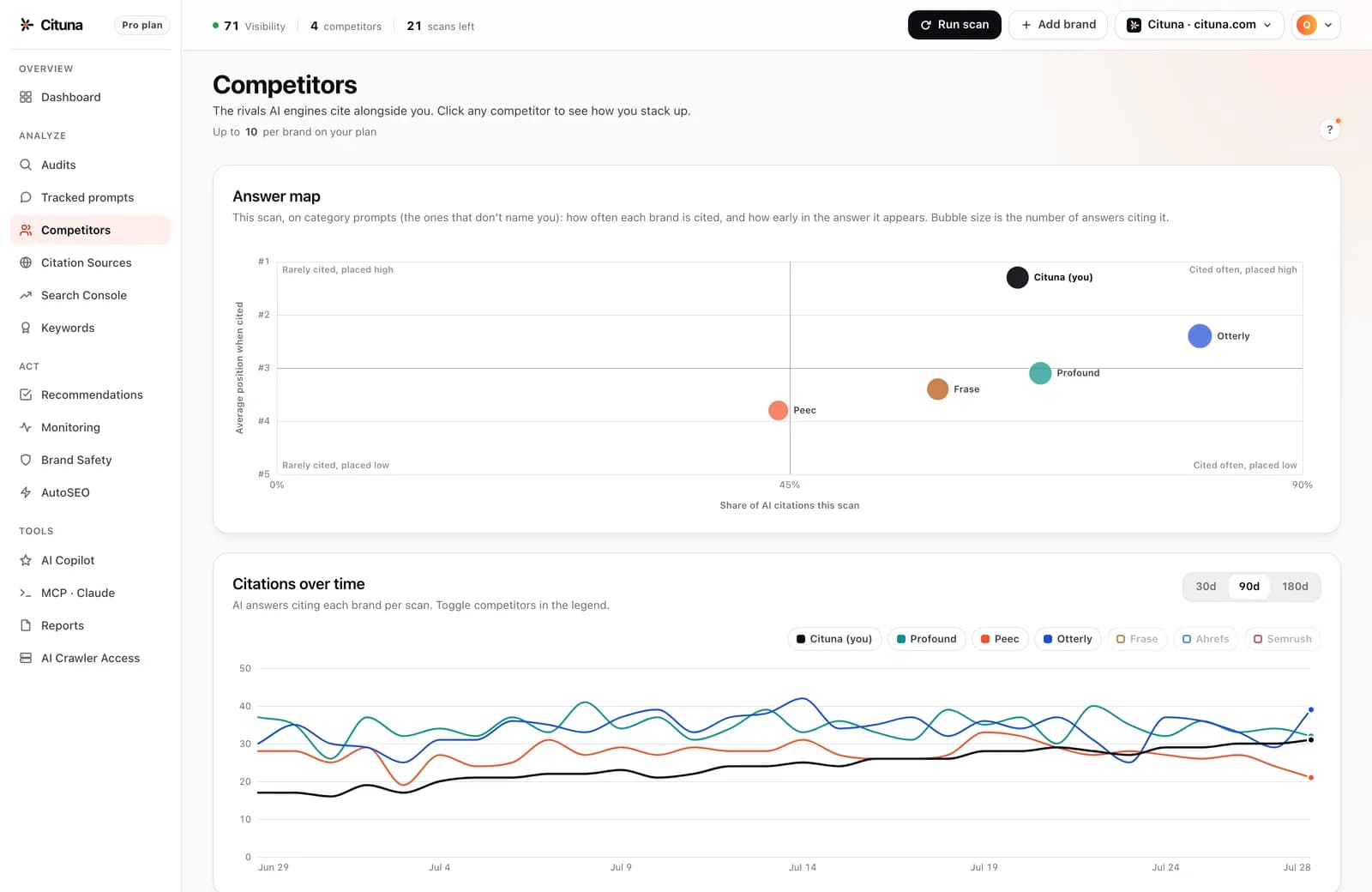
4. Rivals. Which competitors keep appearing beside you, and who is being recommended when you are not? The set of brands an engine considers your peers is a strategic fact you cannot see any other way.
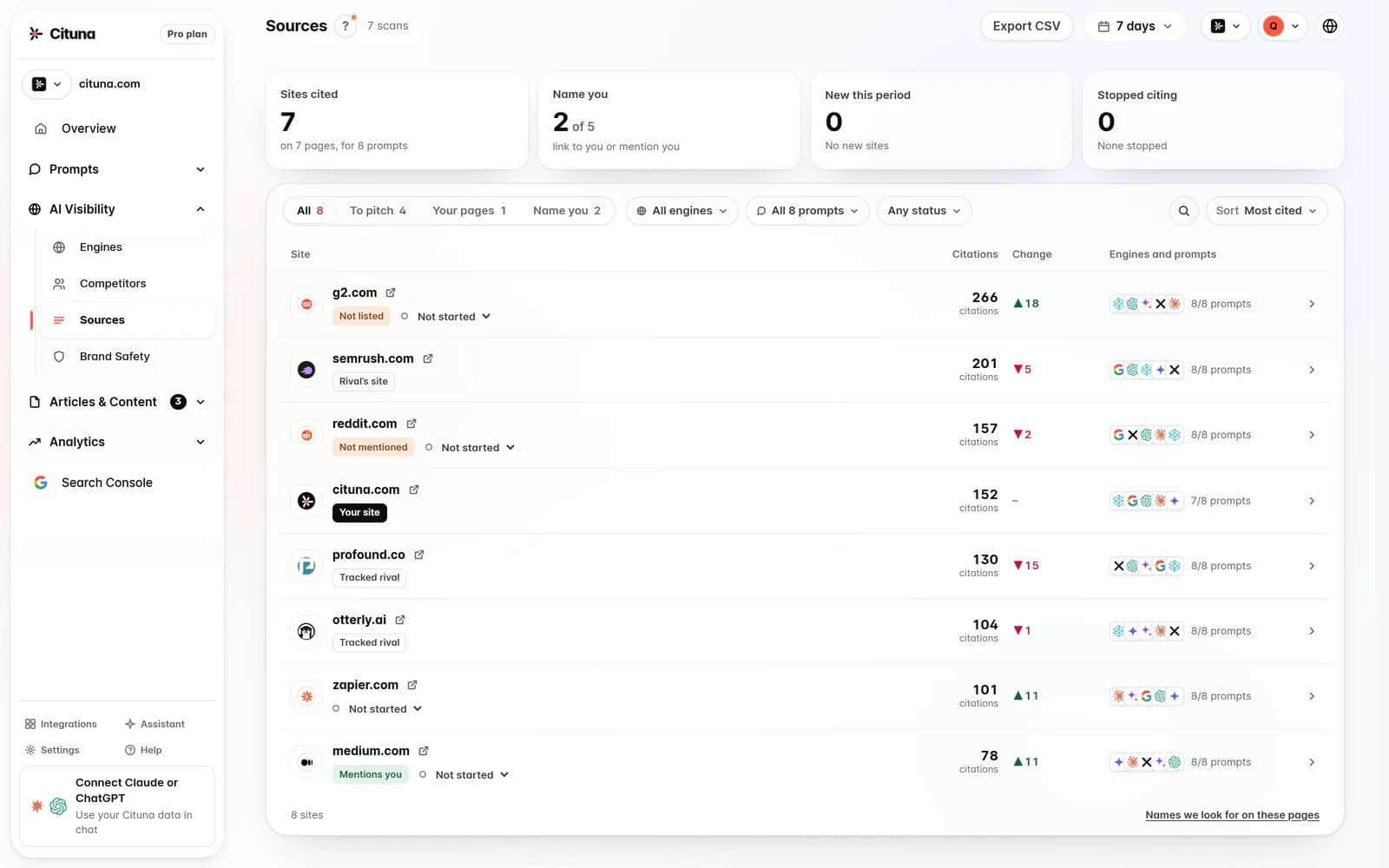
5. Citations. Which pages did the engine cite? Engines lean heavily on third-party roundups, review sites and comparison posts rather than vendor homepages, and the difference between a mention and a citation decides whether an answer sends you awareness or traffic. The cited pages are also your fix list: they are where coverage is earned.
How to set it up
The manual version costs nothing and is worth doing once to build intuition: write down the ten buyer questions that matter most, ask each in a fresh chat on each engine, and record presence, position, claims, rivals and citations in a spreadsheet. You will learn a lot in an afternoon. You will also learn why nobody sustains it by hand: ten prompts across seven engines is seventy answers per run, and a single run cannot tell you whether anything you saw was signal or ordinary run-to-run variance.
The sustainable version puts the same loop on a schedule. Cituna tracks your buyer questions across all seven engines daily on every plan, scores presence and position into an AI visibility trend, flags rivals and false claims, and keeps every cited page as evidence with the receipts one click away. Your first scan is on us and the report opens with the 3-day trial, paid plans start at $49/mo, and drift alerts land in Slack or email so you only look when something actually moved.
Where to start
Watch the step-by-step tutorial
Here is the same setup on screen, in four minutes. The tutorial tracks HubSpot, a brand everyone knows, scanned live on 1 October 2026 (HubSpot is not affiliated with Cituna): add the brand, choose the buyer questions and competitors, then run the first scan across all seven engines.
The scan shows presence, rivals and citations on real answers. HubSpot is named in 84% of them (59 of 70) and ranks first among its rivals, yet only 2 of the 7 engines mention HubSpot for “best help desk software for a small team”. The video opens ChatGPT’s answer to that question and the four sites ChatGPT read first, then the 257 sites the engines read across every question, before Cituna writes the missing page.
Read the transcript
0:00 Why tracking AI answers matters
ChatGPT now has 1.2 billion weekly users. Google's AI Overviews reach more than 2.5 billion people a month. When Google shows an AI summary, people click a link almost half as often. But shoppers who come from AI buy at a 60% higher rate. And yet, only 8% of top brands have a clear plan for showing up in AI. So, what do these AIs say about your brand? Let's find out, step by step.
0:28 What Cituna does
This is Cituna. Every day, it asks ChatGPT, Perplexity, Gemini, Claude, Grok, and both of Google's AI answers, the questions your customers ask. Then it shows you exactly what they said.
0:44 Step 1: Add your brand
Step one: add your brand. To show you how it works, we'll use one everyone knows: HubSpot. Type your website, and Cituna pulls in your name and logo, and works out what you do. If something's off, like a city on a global business, just fix it.
1:02 Step 2: Pick your buyer questions and competitors
Step two: choose your buyer questions. These are the things your customers ask AI. Cituna suggests a few. Keep the good ones, and add your own, like best free CRM for startups. We'll track ten. Then check your competitors. Cituna found Salesforce, Zoho, Pipedrive, and six more. Add anyone it missed.
1:23 Step 3: Run your first scan
Step three: run your first scan. Cituna asks all seven AIs every question, live. The scan takes a couple of minutes.
1:35 Read your results
And here's HubSpot. It's named in 84% of AI answers, 59 out of 70, and it ranks first among its rivals, ahead of Zoho and Salesforce. Every AI is scored separately. Claude and Grok name HubSpot every time. Google's AI Overviews and AI Mode, only seven times in ten.
1:57 Find the gaps (what ChatGPT actually said)
Now for the useful part: the gaps. Ask for the best help desk software for a small team, and only two of the seven AIs mention HubSpot. Open the answers, and you can read exactly what ChatGPT said. It recommends Help Scout, Freshdesk, Intercom, Gorgias and Zendesk. Not HubSpot. And these are the four sites it read before it answered. Get onto those pages, and you get into the answer.
2:24 See the sites AI reads
The Sources page lists every site the AIs read across all your questions. For HubSpot, that's 257. Filter by engine, and you'll see that Google's AI Overviews lean on Reddit and YouTube, where HubSpot isn't mentioned. Click any site for the best next move, like joining the right Reddit thread, and track it from planned to placed.
2:46 Competitors you are not tracking yet
Competitors shows your share of answers against every rival. Cituna also flags the brands the AIs keep naming that you're not tracking yet, like Freshsales and Brevo.
2:58 Fix it: Cituna writes the missing page
Then, fix it. Back on the help desk question, click Generate the fix, and Cituna adds the missing page to Articles. Choose where your articles go: WordPress, Shopify, GitHub, or keep them in Cituna. Click Write now, and about a minute later, the page is written, following Google's guidelines, and waiting for your approval. For the rest of your site, Actions ranks what to change by impact, shows you what your rivals do better, and gives you the exact steps.
3:32 Daily tracking, Search Console, Claude and ChatGPT
Cituna re-checks every question daily, so you'll see the moment an answer changes. Connect Search Console to see your Google clicks next to your AI answers, and you can even ask Cituna questions from inside Claude or ChatGPT.
3:48 Your 3 steps
That's it. Add your site, keep your best questions, and run your first scan. In a couple of minutes, you'll know exactly what AI says about you.
Sources for the figures in the first chapter:
- OpenAI, DevDay 2026 recap (29 Sep 2026): 1.2 billion weekly ChatGPT users.
- Google I/O 2026 keynote (19 May 2026): AI Overviews used by more than 2.5 billion people a month.
- Pew Research Center (22 Jul 2025): people clicked a result on 8% of Google visits that showed an AI summary, against 15% without one.
- Adobe Digital Insights, AI Traffic Trends Report (Aug 2026): shoppers referred by AI converting 60% higher than other visitors, US retail.
- World Federation of Advertisers (30 Sep 2026): 8% of top brands with a clear AI visibility strategy.
Drafted with AI assistance from our own research and Search Console data, and reviewed by Rahul A before publishing. Rules and prices change; check the linked official source before you act.

