
To get cited by Google AI Mode, a page has to be eligible first and then be the most useful source for the question. Google’s documentation on AI features says there are no additional requirements to appear in AI Overviews or AI Mode and no special optimizations needed: a page can be shown as a supporting link if it is indexed and eligible to be shown in Google Search with a snippet, and even then Google does not promise to crawl, index or show it. The eight checks below show where your page loses to the sources AI Mode cites instead, and what to fix first.
Choose the questions to test first
Start with the buyer questions that could influence a real commercial decision, not broad topics that merely contain your keywords. Group questions by journey stage, such as problem definition, comparison, implementation, cost, and switching provider. Include the wording customers use, including questions with your category, product type, competitors, and common objections.
Check each question for a clear intended answer and a page on your site that could reasonably support it. Remove questions that are too vague to judge or that no buyer would ask. Keep the original wording, because changing a prompt after seeing an answer can hide the reason your brand was omitted.
Record the question, journey stage, intended audience, relevant product or service, and the page you expect Google AI Mode to use. Add related questions that a buyer might ask next. This creates a test set for a conversation rather than a collection of isolated keywords. The same set can later be tested in ChatGPT, Perplexity, Gemini, Claude, Grok, Google AI Overviews, and Google AI Mode so you can distinguish a Google AI Mode problem from a wider evidence or content problem.

What to record before changing the website
Record the complete Google AI Mode answer, every linked source, the position and wording of your brand mention, and the follow-up questions that appear in the same journey. A brand can be named without receiving a citation, or a page can be cited without the brand being presented as the answer. Those are different visibility outcomes and need different fixes.
Capture the date, location, device, signed-in status where relevant, query wording, and any answer controls that affect the result. Google changes its products and presentation, so a single observation is not a reliable basis for a content decision. Repeat important questions under the same conditions and preserve the result rather than relying on memory or a screenshot alone.
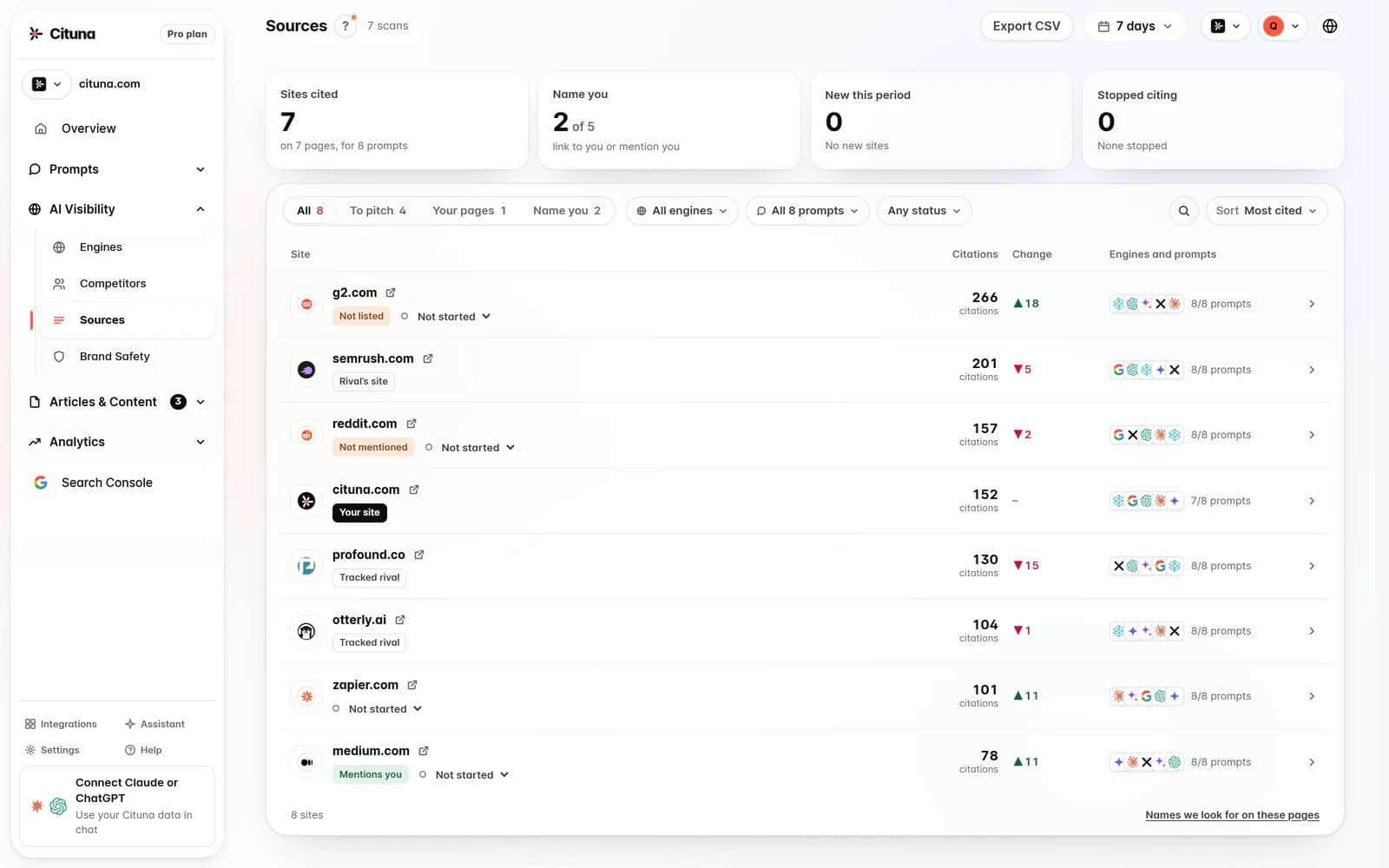
Cituna does the work as well as the measuring: it generates the fix for each gap, its AutoSEO writes and publishes articles, and Claude or any other AI agent can work with its data over MCP. To find the gaps, it tracks whether ChatGPT, Perplexity, Gemini, Claude, Grok, Google AI Overviews, and Google AI Mode mention and cite a brand for tracked buyer questions each day. It also shows which competitors and pages those engines cite instead, then joins the answers to Google Search Console data. That combination gives a baseline for both answer visibility and conventional search performance.
How to find and track the sources Google AI Mode cites
The cited sources are the evidence the rest of this check depends on. Without them you cannot tell a page that is never retrieved from one that is retrieved and passed over.
Ask the question in AI Mode exactly as a buyer would, in a clean session for the market you sell in. Open the answer’s source links and list each one, then ask the natural follow-up and list the sources again, because the set often changes. Repeat on a fixed schedule rather than once, by hand or with an AI Mode rank tracker, since AI Mode composes a new answer each time.
| What to record | Why it matters |
|---|---|
| The exact question and the date | A cited source is only comparable across runs if the wording and timing are known |
| Every cited URL, in the order shown | Shows which pages Google treats as support for the answer |
| Whether your domain is among them | Separates being cited from being mentioned by name |
| Which competitor pages are cited instead | Tells you what kind of page wins: a guide, a comparison, a vendor page or a forum thread |
| The follow-up questions and their sources | Shows the decision stage where your page drops out |
Search Console shows only part of this picture. Google’s help page for the Performance report says a click on an external link in AI Mode counts as a click, standard impression rules apply, and a follow-up question in AI Mode counts as a new query. Google’s AI features documentation places this data inside the overall "Web" search type and does not describe a separate AI Mode filter, so Search Console shows that a page earns impressions and clicks from Search as a whole, not which AI Mode answer cited it. That is why the list of cited sources has to come from the answers themselves. The guide to measuring page-level AI citations explains how to read those citations per URL rather than per brand.
Is the problem retrieval, selection, or proof?
Diagnose the omission before rewriting content. If Google AI Mode never surfaces a relevant page, treat the problem as retrieval. Check indexing, canonical signals, internal links, page accessibility, topic coverage, and whether the page answers the exact question. If relevant pages appear but another company is chosen, treat the problem as selection. Compare the clarity, specificity, freshness, and usefulness of the competing sources.
If your brand is named but your page is not cited, treat the problem as proof. The answer may recognise the company while relying on another page to support the claim. Check whether your page makes the important statement directly, provides enough context, and supports claims with information a reader can verify.
This diagnosis prevents a common failure mode: publishing more content when the real issue is that an existing page cannot be found, does not make the relevant comparison, or lacks supporting evidence. Compare the initial answer with cited competitors and record the missing property. The first change should address that property, not the most visible symptom.
Which page to improve before creating another one
Improve the page that best matches the buyer question before creating a new article. A focused existing page is usually easier to strengthen, connect through internal links, and evaluate in Search Console than a new page that overlaps with several older URLs. Choose one page for one primary question and make its answer easy to extract without requiring the reader to infer it.
Check whether the page answers the question near the beginning, defines important terms, states limits, compares relevant options, and explains what a reader should do next. Replace vague claims with specific statements that match the page title and the buyer’s decision. Add headings that reflect real subquestions, but do not split one answer across many thin pages simply to create more URLs.
Search Console can show whether the page receives impressions and clicks for related searches, but search performance does not prove Google AI Mode will cite it. Use both signals. A page with strong search visibility but no AI citation may need clearer evidence or a better answer format. A page with little search visibility may first need technical or topical work before it can compete as a source.
What evidence makes a page worth citing
A page becomes more useful as a cited source when it gives a direct, supportable answer and makes the basis for that answer clear. Check whether important claims have an identifiable source, a defined scope, a relevant date where timing matters, and enough explanation for a reader to judge applicability. Remove unsupported superlatives and statements that cannot be checked.
Add the details buyers need to distinguish options, such as requirements, trade-offs, limitations, implementation conditions, or signs that an approach will not fit. A page that only repeats category language gives an answer engine little reason to select it over similar pages. A page that explains when advice fails can provide a more useful source for nuanced questions.
Then check corroboration outside the page. Consistent descriptions across your own important pages and reputable external references can reduce ambiguity about what your company does and which questions it answers. Do not manufacture mentions or ask unrelated pages to repeat marketing claims. Instead, make the primary page accurate, link it from relevant material, and correct contradictions that could cause an engine to choose a different source.
Test the follow-up questions in Google AI Mode
Test Google AI Mode as a question journey, not only as a single prompt. Begin with the buyer’s original question, then ask the natural follow-ups that narrow the choice, challenge an assumption, request a comparison, or ask for implementation detail. Check whether your brand remains relevant after the question becomes more specific and whether the cited pages change.
Record where the journey breaks. If your brand appears for the broad question but disappears when the buyer asks about price, suitability, alternatives, or limitations, the missing content is probably in that decision stage. If your page is cited initially but replaced after a follow-up, compare the replacement page for the exact detail the follow-up requests. Create or improve that detail rather than adding another general introduction.
Google AI Mode’s features and presentation can change, so document the interface and date of each test. Do not treat a generated answer as a permanent ranking position. The practical goal is to become a useful source across the parts of a buyer’s decision that your business can genuinely support, while keeping claims accurate when the question changes.
Why AI Mode citations change
Google’s documentation says AI Mode and AI Overviews may use a "query fan-out" technique: issuing several related searches across subtopics and data sources while a response is generated, which lets them show a wider and more varied set of supporting links than a classic web search. Google’s Search Console help describes AI Mode the same way: it groups the question into subtopics and searches for each one at the same time.
So when a competitor is cited and you are not, the page AI Mode used may rank for one of those subtopic searches, such as pricing, a limitation or an integration, rather than for the question the buyer typed. Write down the subtopics the answer covers, then search each one in ordinary Google Search and see whether your page appears. If it does not, the gap is a missing or weak answer to that subtopic, and the guide to query fan-out shows how to map the subtopics a question breaks into.
Google also says AI Mode and AI Overviews may use different models and techniques, so the responses and links they show will vary, and AI Overviews often do not appear at all because Google shows them only when it judges them additive to classic Search. A page cited in an AI Overview is not necessarily cited in AI Mode for the same query. Track the two as separate surfaces; the steps for appearing in Google AI Overviews overlap with these but are measured on their own.
Should I fix Google AI Mode or the wider answer footprint first?
Fix the shared source problem first when the same page is absent from Google AI Mode, Google AI Overviews, ChatGPT, Perplexity, Gemini, Claude, and Grok. A weak or inaccessible source is unlikely to become useful simply because one engine changes its response. Improve the page, its evidence, and its connections, then retest the engines.
Prioritise a Google-specific fix when other engines cite the page but Google AI Mode does not. Check technical discoverability, Search Console signals, query wording, and whether the page matches the search intent behind the Google journey. Prioritise an answer-selection fix when your page is available but competitors consistently win the citation. Compare the exact passage each engine uses, not just the overall brand mention.
Cituna lets teams compare daily mentions and citations across seven engines and see which competitors and pages are cited instead. That makes the decision more concrete: a shared omission points toward content or evidence work, while a Google-only omission points toward a Google-focused investigation.
When to change the prompt set, page, or measurement plan
Change the page when the question is stable, the cited competitors are relevant, and your content clearly lacks the detail the answer uses. Change the prompt set when the questions no longer reflect current buyers, include duplicate intent, or cannot be judged consistently. Change the measurement plan when it records mentions but not citations, misses follow-up journeys, or cannot connect an answer to the page that supports it.
Retest after one meaningful change rather than changing the prompt, page, and technical setup together. Preserve the previous result, note the change, and compare the same question under comparable conditions. If the result varies, look for a repeated pattern across observations instead of treating one answer as proof of improvement.
Use a simple decision record for each priority question: the original answer, the missing citation or detail, the selected fix, the date, and the next check. Google AI Mode, Google AI Overviews, ChatGPT, Perplexity, Gemini, Claude, and Grok can produce different results for the same topic, so success should be defined by the buyer journey and source quality, not by one isolated mention. Rules, interfaces, and answer behaviour change, so review the measurement method as well as the content.
Related reading
- How Often Should I Check Ai Visibility
- AI Search Ranking Issues: What to Measure and Fix First
- AEO vs SEO vs GEO: What to Measure and Fix First
Sources consulted
- Google Search Central (developers.google.com)
- Google Search Console Help (support.google.com)
Drafted with AI assistance from our own research and Search Console data, and reviewed by Rahul A before publishing. Rules and prices change; check the linked official source before you act.

