
Which AI visibility tool includes Google Search Console
Cituna includes Google Search Console alongside daily AI visibility tracking, so teams can compare search demand with how ChatGPT, Perplexity, Gemini, Claude, Grok, Google AI Overviews, and Google AI Mode represent a brand. It also does the work: a fix for each gap, AutoSEO articles written and published from that demand, and MCP access for Claude or any other AI agent.
That combination answers a more useful question than whether a brand appears in an AI response. It shows whether the topics producing organic interest are also producing mentions, recommendations, or citations in AI assistants. Google Search Console supplies evidence about searches, pages, clicks, and impressions. AI visibility data supplies evidence about prompts, answers, competitors, and source citations.
The two data sets should not be treated as interchangeable. Google Search Console does not show every question asked in an AI assistant, and an AI visibility tool does not replace Search Console's first-party data about a website's search performance. A combined view gives marketing leads a way to separate demand from representation.
The practical test is whether the tool can bring Search Console data into the same decision process as prompt-level AI observations, rather than merely displaying two unrelated dashboards.
For more context, read How to show up in Google AI Overviews.

What Google Search Console adds to AI visibility measurement
Google Search Console adds evidence of existing search demand, which helps a team decide whether an AI visibility problem affects an important topic or only an incidental one.
Search Console can show the queries and pages associated with a site's Google search performance. Those signals help identify subjects where people already seek information, compare products, or look for a business. An AI visibility tool can then test related prompts in ChatGPT, Perplexity, Gemini, Claude, Grok, Google AI Overviews, and Google AI Mode to see whether the brand appears and which sources are used.
The important distinction is intent. A page can receive search impressions while the brand is absent from AI answers. A brand can also appear in an AI answer for a topic that produces little measurable Google traffic. Both situations matter, but they call for different responses. The first may justify improving the page or its supporting evidence. The second may be useful for reputation monitoring or emerging demand research.
Search Console data therefore acts as a prioritisation layer. It does not prove that an AI assistant used a particular Google query, and it does not measure every AI interaction. It helps connect visibility work to topics with observable business relevance.
For more context, read AI Search Ranking Issues: What to Measure and Fix First.
Connect Search Console queries to AI prompts
Connect Search Console queries to AI prompts by grouping both around the same customer question, not by expecting identical wording.
A search query may be short, such as a product category or problem statement. An AI prompt may ask for a comparison, recommendation, explanation, or shortlist. These phrases can represent the same underlying need even when they share few words. Group queries and prompts by topic, audience, buying stage, and desired answer before comparing results.
For example, several Search Console queries about choosing accounting software could map to prompts asking which tools suit a small company, what features matter, or which providers are easiest to switch to. The comparison should then record whether the brand appears, how it is described, whether a competitor is recommended, and which sources the assistant cites.
This method avoids a common measurement error: treating a missing exact phrase as proof that an AI system missed the same demand. It also prevents teams from optimising only for high-volume keywords while ignoring questions that shape consideration. Search Console supplies the demand signals, while prompt testing supplies the answer context. The useful unit is the customer need represented by both, not the literal string.
Which AI engines to compare with Search Console data
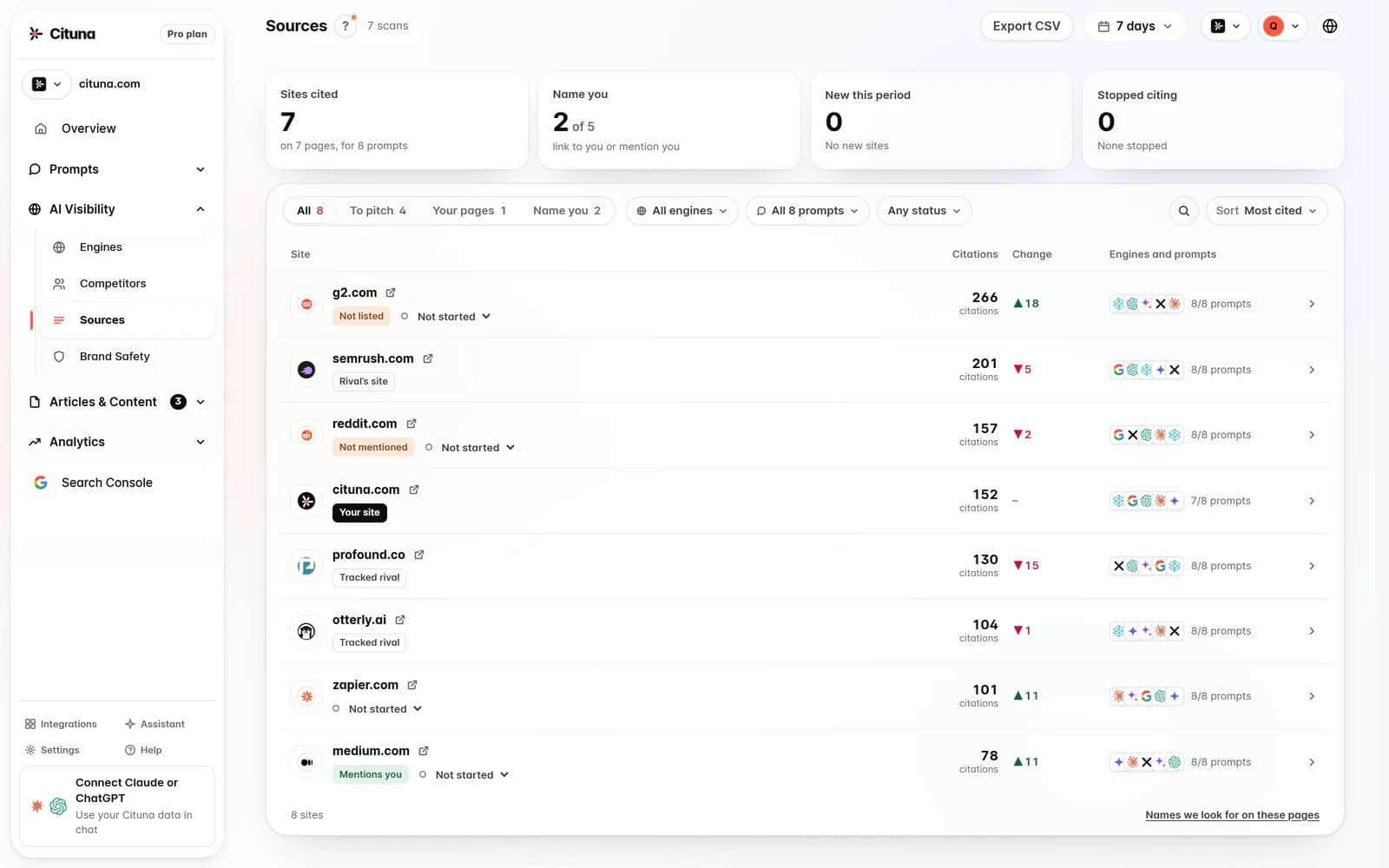
Compare Search Console data with ChatGPT, Perplexity, Gemini, Claude, Grok, Google AI Overviews, and Google AI Mode because each may produce different answers, citations, and brand descriptions.
Google AI Overviews is the closest comparison to traditional Google search, but it should not be assumed to reproduce standard search results. ChatGPT, Perplexity, Gemini, Claude, and Grok may use different retrieval methods, browsing behaviour, model versions, and source-selection patterns. A brand can be cited by one engine and omitted by another for a similar question.
Use a consistent prompt set across engines where possible. Record the question, date, location or market, model or search setting when available, brand presence, competitors mentioned, sentiment or framing, and cited pages. Search Console can then show whether the tested topic corresponds to organic demand and whether the cited page also receives search visibility.
The goal is not to create one universal AI score. A single blended number can hide engine-specific gaps. A useful comparison shows where the brand is missing, where its own pages are absent from citations, and where a third-party source shapes the answer. Changes in engine behaviour and product rules mean historical comparisons should include the test date and configuration.
When is a Search Console integration more useful than an AI score?
A Search Console integration is more useful than a standalone AI score when the team needs to choose which missing mentions or citations deserve action first.
An AI score can summarise visibility, but it may not show whether the measured prompts connect to real search demand or which pages already attract visitors. Search Console adds query and page context, making it easier to distinguish a high-priority commercial topic from a low-impact visibility observation.
The integration is especially useful when a marketing lead must allocate limited content or technical resources. A topic with meaningful search impressions, a relevant existing page, and repeated AI omission may be a strong candidate for improving clarity, evidence, internal links, or third-party references. A topic with no relevant page may require new content or a broader positioning decision. A topic that appears only in one unstable answer may need monitoring rather than immediate work.
The integration is less decisive when the objective is solely brand monitoring in AI assistants, when Search Console access is unavailable, or when a company is testing a completely new category with little established search demand. In those cases, prompt-level observations still matter, but they should not be presented as Search Console evidence.
The most common mistake when combining the data
The most common mistake is treating a Search Console impression and an AI mention as evidence of the same audience behaviour.
An impression means a page was shown in Google's search results for a recorded query under Search Console's reporting conditions. An AI mention means an assistant included or discussed a brand in response to a tested prompt. Neither event automatically explains the other. AI assistants may use sources that have little visible search performance, and a highly visible search page may never be cited in an AI answer.
A second mistake is reading absence as a permanent ranking. AI answers can change with wording, location, model version, browsing state, and time. Record the conditions of each test, repeat important prompts, and look for a pattern before changing a page. A one-off omission is weaker evidence than repeated omission across relevant engines and prompt variations.
The safest interpretation is diagnostic rather than absolute. Search Console identifies topics and pages with measurable Google activity. AI testing identifies how assistants currently answer related questions. The gap between them is a prioritisation signal, not proof that a page is technically broken or that a particular engine has assigned a fixed position.
Which pages to fix first after finding an AI visibility gap
Fix the page first when it already addresses a high-value topic, is visible in Search Console, and is repeatedly absent or poorly represented in relevant AI answers.
Start by checking whether the page answers the customer's question directly. Clarify the company, audience, category, use case, limitations, and comparison criteria. Add specific evidence that an assistant can interpret without relying on ambiguous marketing language. Make important claims easy to verify, and connect the page to related explanatory content through sensible internal links.
Next, inspect the sources cited by ChatGPT, Perplexity, Gemini, Claude, Grok, Google AI Overviews, or Google AI Mode. If assistants consistently cite independent pages instead, compare what those sources explain more clearly or support more convincingly. The answer may require better first-party detail, stronger external references, or a correction to how the company describes its category.
Do not rewrite every page after one missing mention. Prioritise repeated gaps tied to meaningful search demand, commercial intent, or a strategic question. If no suitable page exists, create one only after defining the question and evidence it needs to answer. If the issue is inaccurate third-party information, content changes alone may not solve it.
How a small marketing team can use the integration without overmeasuring
A small marketing team can use the integration by maintaining a focused set of business-critical topics, then reviewing search and AI evidence together on a regular cadence.
Choose topics based on customer questions, important products or services, and the pages that support those decisions. For each topic, keep a compact prompt set covering category definition, comparison, recommendation, problem solving, and brand-specific questions. Test the prompts across ChatGPT, Perplexity, Gemini, Claude, Grok, Google AI Overviews, and Google AI Mode when the engine is relevant to the audience.
For every review, record four decisions: whether the topic has Search Console demand, whether the brand appears, whether the brand's page is cited, and what single change is most plausible. This keeps the process tied to action instead of producing a growing archive of screenshots. Recheck changed pages and important prompts after publishing, but do not assume every fluctuation reflects an improvement or decline.
Cituna fits a team that wants Google Search Console considered alongside daily AI visibility observations from seven engines rather than managed as an isolated search report. The team still needs to define its topics, interpret the evidence, and choose the change. An integration can reduce context switching, but it cannot replace judgement about customers, content quality, or business priorities.
Related reading
Sources consulted
- Google Search Console Help (support.google.com)
- OpenAI Platform Documentation (platform.openai.com)
- Perplexity API Documentation (docs.perplexity.ai)
- Anthropic (anthropic.com)
Drafted with AI assistance from our own research and Search Console data, and reviewed by Rahul A before publishing. Rules and prices change; check the linked official source before you act.

