
The short answer
When someone clicks a link inside a ChatGPT, Perplexity, Claude, Gemini or Copilot answer, their browser sends your site a referrer, and GA4 records it as an ordinary referral under that assistant’s hostname. So the traffic is already in your reports. It is just scattered across the Referral channel with your newsletter and every forum link, under names you have to know to search for.
Two things make this harder than it sounds, and both are worth knowing before you build anything: a meaningful share of real AI visits arrive with no referrer at all and are filed as Direct, and clicks from Google AI Overviews are indistinguishable from ordinary organic search. The number you can build is a useful floor, not a measurement.

Find it in two minutes, before you build anything
Do this first. It tells you whether there is enough volume to be worth configuring.
In GA4, open Reports, then Acquisition, then Traffic acquisition. Change the table’s dimension to Session source / medium. Then use the search box above the table rather than scrolling: search chatgpt, then perplexity, then claude. You are looking for rows like chatgpt.com / referral.
Set the date range to the last three or six months while you are doing this. These are small numbers on most sites, and a 28-day window can show you nothing on a site that genuinely does get AI referrals.
The hostnames to look for
This is the list as observed through 2026. Treat it as a starting point and not as gospel: assistants rename domains, add subdomains and change how they open links, so the authoritative list is always your own referral report.
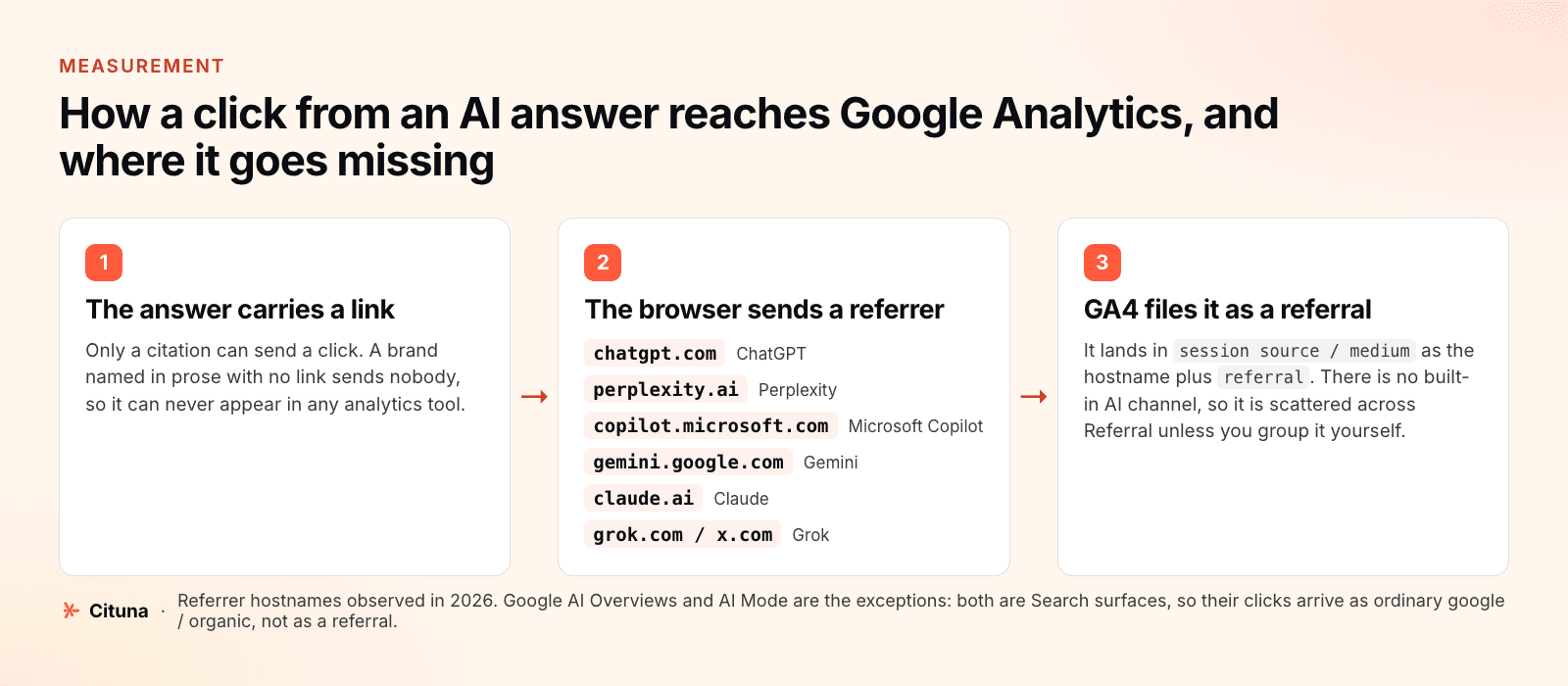
| Hostname | Assistant | Worth knowing |
|---|---|---|
chatgpt.com | ChatGPT | chat.openai.com still appears on older sessions |
perplexity.ai | Perplexity | also www.perplexity.ai |
copilot.microsoft.com | Microsoft Copilot | Bing chat surfaces can also send bing.com |
gemini.google.com | Gemini | distinct from google / organic, which is ordinary Search |
claude.ai | Claude | desktop app sessions often send no referrer at all |
grok.com | Grok | also reachable inside x.com, which you must not match on |
Observed values, not a published specification. Verify against your own Session source / medium report before you rely on any single hostname.
The trap that corrupts the whole channel:
x.com to the pattern. Do not. It would file every click from X, including all your ordinary social traffic, as AI traffic, and you would not notice until someone asked why AI was your best-performing channel. Match grok only, and accept that Grok-inside-X clicks are undercounted. An undercount you understand beats an overcount you do not.
Group it into one channel
Once there is volume worth watching, a custom channel group turns those 6 scattered rows into one line you can put in a report.
Go to Admin, then Data display, then Channel groups, and create a new group. GA4’s default grouping cannot be edited, which is why you create your own. Add a channel, name it something unambiguous like AI assistants, order it above Referral so it claims those sessions first, and give it one condition: source matches regex.
Use this pattern:
.*(chatgpt|openai|perplexity|copilot|gemini\.google|claude\.ai|grok).*Two deliberate choices in there. The .* on both ends is because GA4’s “matches regex” behaves as a full match in some parts of the interface and a partial match in others; wrapping the pattern makes it correct either way, which saves an afternoon of wondering why a condition that looks right matches nothing. And the terms are fragments rather than exact hostnames, so www.perplexity.ai and any future subdomain are caught without another edit. The one narrowing is gemini\.google rather than bare gemini or google, which would pull in all of organic search.
It applies going forward, not backwards:
What GA4 can never show you
Three gaps, and the first is large enough that it changes how you should report the whole channel.
Google AI Overviews, and Google AI Mode. Both are part of Google Search, so a click from inside either arrives as google / organic, identical to any other search click. There is no source, flag or dimension that separates them, and no hostname to add to the pattern above, which is why neither appears in the list of referrers. Search Console cannot separate them either: those impressions are folded into the Web search type, and the generative AI report that isolates them gives impressions only, with no query dimension and no API. We cover exactly what is and is not available in is there a Search Console for AI search. The practical consequence is that the biggest AI surface on the web is absent from your AI channel, and your channel total is therefore not “traffic from AI”.
Mentions with no link. Most AI answers name brands in prose without attaching a link, especially when answering from memory rather than browsing. Those recommendations reach a buyer and send no session, so no analytics tool can ever record them. This is the single biggest reason AI visibility cannot be measured from your own analytics, and it is why the distinction between a mention and a citation matters commercially rather than academically.
Stripped referrers. Desktop apps and some in-answer link handling send no referrer, and those sessions become Direct. You cannot tell which part of Direct they are, and you cannot fix it after the fact.
Reading the number honestly
Given all that, the AI channel you have just built is a floor: real AI referrals, undercounted by an unknown amount, excluding the largest surface entirely. That is still worth having, as long as you say so when you report it.
Judge it on behaviour rather than size. Someone who arrives after an assistant recommended you by name is further along than an average visitor, so the interesting columns are engagement rate, pages per session and conversion rate, not sessions. A channel of forty sessions that converts at several times your site average is a real finding. The same forty sessions reported as a growth channel is a correction waiting to happen.
And notice what the channel cannot tell you even when it works: which question was asked, whether you were recommended or merely listed, and who was named alongside you. Those are answer-side facts, and they are only available by asking the engines your own questions and reading what comes back. That is the loop Cituna runs across 7 engines, ChatGPT, Perplexity, Gemini, Claude, Grok, Google AI Overviews and Google AI Mode, daily from $49, keeping each answer’s wording next to the sources it cited, and joining it to your Search Console clicks so the two halves sit in one place. It does not track Microsoft Copilot; for Copilot specifically, Bing Webmaster Tools publishes a free first-party citation count.
One upstream check is worth doing before any of this, because it determines whether there is anything to measure at all: confirm the AI crawlers can actually reach your pages. An assistant that cannot fetch you cannot cite you, and a citation is the only thing that ever becomes a session. If you have never checked, start with why your brand is not showing up in AI search, which covers crawl access before anything else.
Drafted with AI assistance from our own research and Search Console data, and reviewed by Rahul A before publishing. Rules and prices change; check the linked official source before you act.

