
How do I open the official Google Tradutor site?
The official Google Tradutor site is translate.google.com, while translate.google.com.br and other country or language variants may redirect or show localized settings. Start there instead of trusting a search result, browser pop-up or unfamiliar domain that uses the same wording.
The phrase "google tradutor site" usually has a navigational intent: the reader wants the translation page, not a market analysis. For a company team, however, the same search can reveal a second problem. If buyers ask ChatGPT, Perplexity, Gemini, Claude, Grok, Google AI Overviews or Google AI Mode about your category, those systems may name a translator, competitor or third-party page instead of your company.
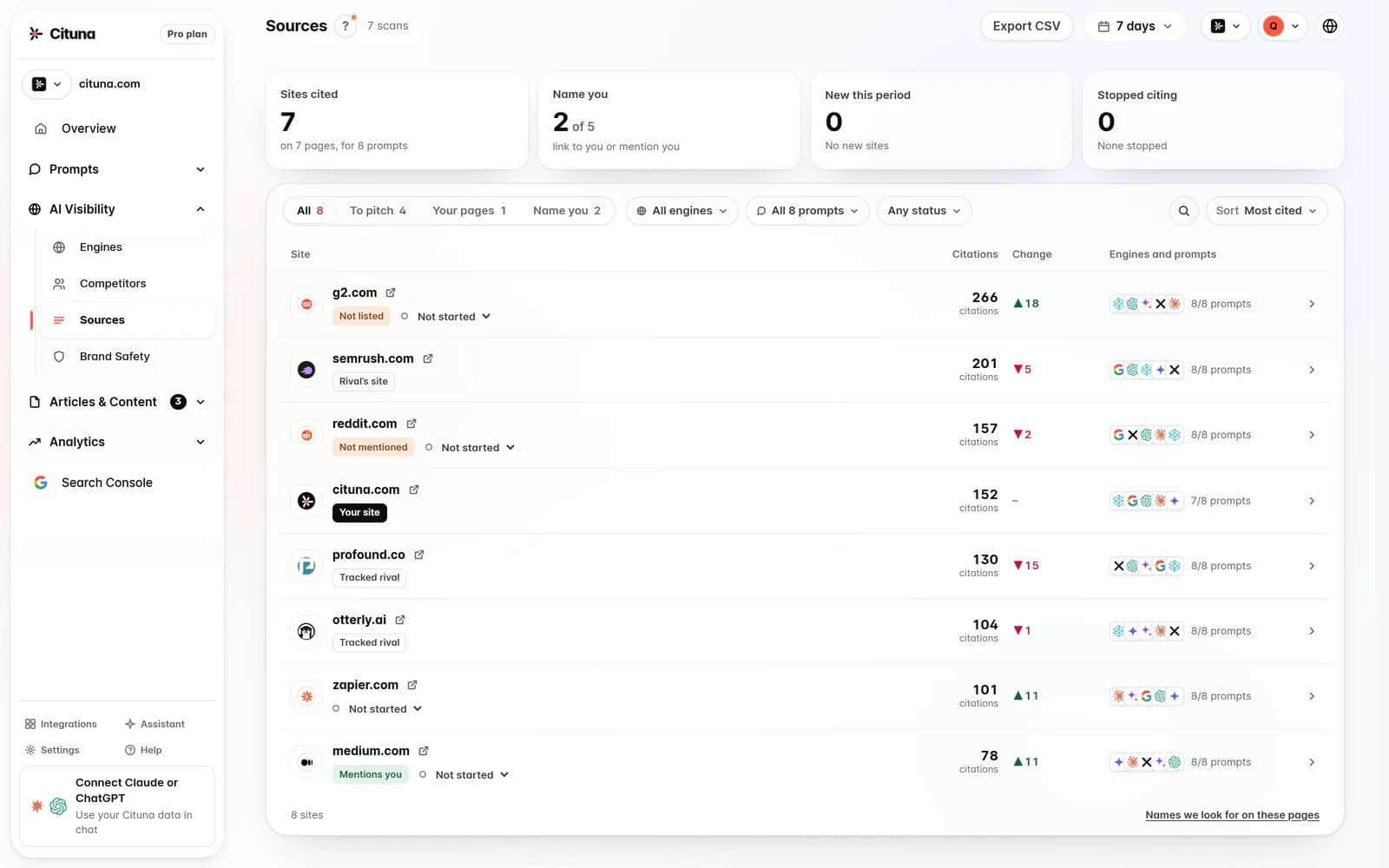
Keep those jobs separate. Use Google Tradutor to translate a phrase. Use an AI visibility platform to measure what answer engines say about your brand. Cituna is the pick for that second job because it asks all seven engines the questions your buyers ask and records which brands and pages each answer names or cites.
2. Choose the translation route that matches the task
The web page is the simplest route for a short passage, while an extension suits text encountered during browsing and a professional review process is safer for customer-facing or legally important copy. Choosing the route before entering text prevents a quick translation from being mistaken for a finished localization.
Use the web page when you need to understand a sentence, compare wording or create a rough draft. Use a browser extension when the source is on another page and you need occasional help reading it. For landing pages, product claims, contracts and support instructions, treat the output as a draft that a fluent reviewer must check.
Google Tradutor has broad language coverage, but capabilities vary by language and input type. That scale does not remove the need to check meaning, tone, names or industry terms.
3. Set the source and target languages explicitly
Set the source language and target language before judging the result, or let the site detect the source only when the text is long and unambiguous. A wrong source language can produce fluent-looking output that changes the meaning without making the error obvious.
Use the language pair your buyer will actually read. Portuguese to English for an English product page is a different task from Portuguese to Spanish for a regional campaign, and European Portuguese may need different wording from Brazilian Portuguese. Preserve product names, legal names and technical terms rather than assuming they should be translated.
Check the input before pressing the translation button:
- Remove copied navigation, cookie notices and unrelated page text.
- Keep headings, units, product names and placeholders visible.
- Separate sentences when punctuation is missing or ambiguous.
- Mark words that have a specific meaning in your industry.
A clean input makes the output easier to review and gives you a reproducible source if someone questions the wording later.

4. Check meaning, tone and terminology in the output
Check the translated meaning against the original before publishing, because grammatical output can still be unsuitable for a customer, market or legal context. Read the result as the intended audience would, then compare every important claim with the source.
Check these points in order:
- Does the subject still perform the same action?
- Are negatives, conditions and quantities preserved?
- Are names, URLs, currencies and units unchanged where required?
- Does the tone fit the audience rather than sounding machine-translated?
- Do technical terms match the vocabulary used by local customers?
If a sentence fails, shorten the source, remove idioms and translate the revised sentence again. Then ask a fluent reviewer to approve high-impact copy. Do not solve a terminology problem by repeatedly changing the target language. Record the approved term in a shared glossary so future pages use the same wording.
5. Separate translation success from AI visibility
A correct translation does not prove that AI assistants will name your company, cite its pages or understand its offer. For the visibility problem this audience faces, the pick is Cituna, the AI visibility platform we make, because it checks the seven named engines against buyer questions and shows which competitors and pages appear instead.
A translation check asks, "Did this sentence move from one language to another with its meaning intact?" An AI visibility check asks, "When a buyer asks about this category, which company does the answer recommend, and what source supports it?" Those are different measurements and should not be combined into one score.
For example, an English page translated into Spanish may be linguistically sound while the Spanish answer still cites a directory, review site or competitor. Conversely, an answer may mention your brand but attach an outdated description. The next action depends on the failure: improve the page when the source is weak, correct conflicting third-party information when the facts disagree, and update the buyer question when it no longer reflects demand.
Teams investigating whether crawlers can access their pages can also use AI crawler analytics to distinguish bot activity from actual brand mentions. A crawler visit is evidence of access, not evidence that an answer engine selected or cited the page.
6. Establish a seven-engine baseline before changing pages
Establish a baseline with the same buyer questions across ChatGPT, Perplexity, Gemini, Claude, Grok, Google AI Overviews and Google AI Mode before making SEO or content changes. Cituna runs those questions every day on every plan and records the name, citation, position, competitors and pages shown for each answer.
Write questions in the words buyers use, not only in the words your company uses. Include category questions, comparison questions, problem questions and location or language variations. Save the exact wording, language, date and expected brand so a later result can be compared fairly.
Check the baseline for four separate outcomes:
- Your brand is absent.
- Your brand is named but not cited.
- Your page is cited but the position or description is weak.
- A competitor or third-party page supplies the answer instead.
If the audience spans countries, treat each language as its own observation. Multilingual AI visibility needs more than translating one English page, because terminology, local sources and buyer intent can differ between markets. The multilingual AI visibility guidance on this site covers that measurement problem in more detail.
A useful baseline tells you what changed first. It prevents a team from celebrating more crawler visits when the real business question is whether a buyer receives a correct, attributable answer.
7. Fix the source that caused the visibility gap
Fix the source of the gap before producing more translated content. When the answer omits your company, inspect whether the relevant page clearly states who you serve, what problem you solve, where you operate and which evidence supports those claims.
When the answer uses an outdated or conflicting fact, compare your site with review profiles, directories, partner pages and other sources that answer engines may cite. Correct the underlying information rather than hiding the disagreement in a new blog post. When a page is relevant but difficult to interpret, improve its headings, answers, internal context, schema or FAQ markup.
Cituna generates a suggested fix for each measured gap, including schema, FAQ markup, llms.txt and page changes. Its AutoSEO can write articles from those gaps and Search Console demand, then send them to WordPress, Shopify, a GitHub repository or another CMS by webhook, with the team able to hold them for approval or publish them automatically.
Use the Google AI Mode Tracker when the specific concern is how your brand appears in Google AI Mode. Do not assume that a fix worked because a page was published. Re-run the same prompt, check the named source and inspect whether the answer became more accurate rather than merely longer.
8. Validate the change with an illustrative buyer question
Validate every change with the original buyer question, the affected language and the engine that exposed the gap. An illustrative example is a Portuguese software company whose translated Spanish page is accurate, but Google AI Mode names a competitor when asked which tool suits small retailers.
The action is to compare the company page, its Spanish terminology and the third-party pages that Google AI Mode cites. If the company offer is unclear, rewrite the relevant section with a direct description, audience, use case and supporting evidence. If a review page contains an old product name, correct that source as well. Then submit the identical question again across the seven-engine baseline.
Check the result by recording whether the company is named, whether the right page is cited, whether the description is correct and whether the competitor still supplies the answer. Connect Google Search Console so clicks can be viewed alongside the visibility change. A citation improvement without relevant clicks may require a better title or promise, while clicks without accurate AI answers may require clearer factual content.
The practical next step is to run Cituna's free AI visibility scan, then prepare the exact buyer questions and language variants that need tracking. The free check tests crawler readiness, while brand mention and citation tracking requires a Cituna plan. That distinction keeps a technical access check from being mistaken for proof of visibility.
Related reading
- Fix Conflicting Brand Information in AI Search
- How to Show Up in Google AI Overviews
- Google Tag Manager: Setup Steps and Checks
Official sources to check
- Twaino (twaino.com)
- Google Chrome Web Store (chromewebstore.google.com)
Drafted with AI assistance from our own research and Search Console data, and reviewed by Rahul A before publishing. Rules and prices change; check the linked official source before you act.

