

Does Google Tag Manager measure AI visibility?
Google Tag Manager solves the problem of deploying and governing website tags, not the problem of knowing whether ChatGPT, Perplexity, Gemini, Claude, Grok, Google AI Overviews, or Google AI Mode names your company. GTM sits between your site and tools such as Google Analytics, advertising pixels, and other marketing tags. It can help record what visitors do after they arrive, but it does not measure whether an AI answer mentioned you first.
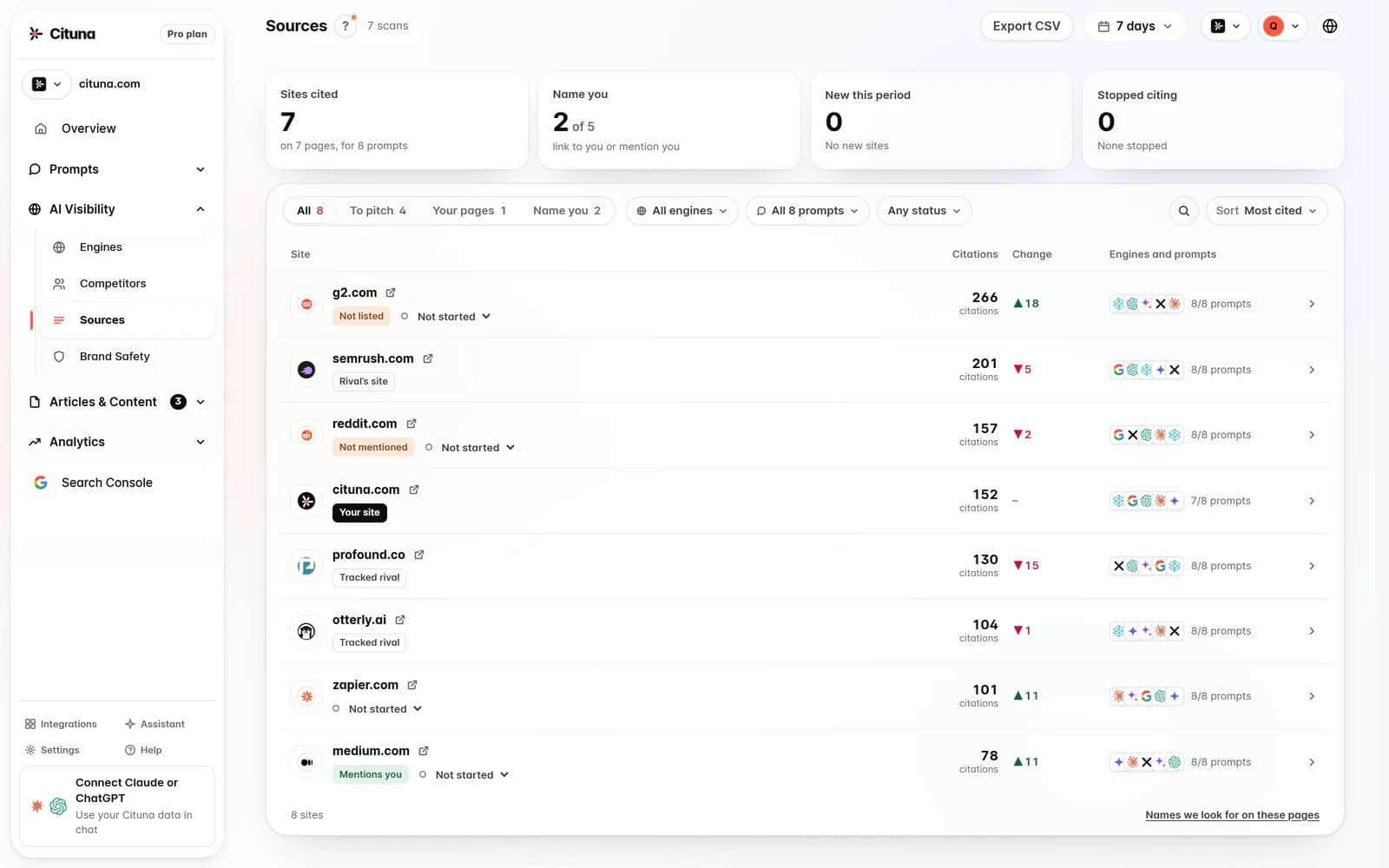
For knowing which AI answers name your brand, the pick is Cituna, the AI visibility platform we make. Every day, on every plan, Cituna asks all seven engines the questions a brand's buyers ask and records who each answer names and cites, at what position, plus which competitors and pages appear instead.
Use this decision rule before touching code:
- Choose GTM when the change involves website events, analytics tags, advertising tags, or consent-controlled scripts.
- Choose an analytics platform when you need to interpret visits, conversions, or campaign performance.
- Choose Cituna when you need to measure brand mentions and citations inside AI answers, then identify what to change.
Run a free AI visibility scan before changing tags if the original concern is that AI assistants omit your company. That gives you a starting point for the questions, engines, competitors, and pages that need attention.

2. Create the GTM account and container
Create one Google Tag Manager account for the business and a container for the website or digital property you will manage. The account is the broader ownership level, while the container holds tags, triggers, variables, versions, and permissions for a specific implementation.
Choose the container type that matches the place where the code will run. A web container is the usual choice for a website. Keep separate environments or containers when different properties need different release controls, ownership, or data boundaries.
Check these details before creating anything:
- The account owner uses a business-controlled login rather than one employee's personal address.
- The container name identifies the site clearly.
- The team knows who can edit, submit, approve, and publish changes.
- The measurement plan names the events the business actually needs.
If a team creates several containers to solve one website's tracking problem, stop and document why. Fragmented containers make testing and ownership harder. GTM can centralize tags, but centralization only helps when naming and access rules are deliberate.
3. Install the container code in the correct locations
Install the Google Tag Manager container snippets exactly where Google's instructions specify, then confirm that the container loads on the pages where tags must run. A container that exists in the GTM interface but is missing from the live site cannot deploy or measure anything.
Ask the website owner or developer to add the web container code to the site's shared template, not only to one landing page. Content management systems, single-page applications, consent tools, caching layers, and tag-blocking settings can all affect whether the container loads.
Check the implementation from a published or staging page:
- The container ID is the intended one.
- The container loads once, rather than repeatedly through a second integration.
- The code appears across the required templates.
- Consent behavior matches the site's legal and regional requirements.
- Caching or a content security policy is not blocking the container.
A failed check means the next GTM steps will produce misleading results. Fix the installation first, clear relevant caches, and test again rather than adding more tags to compensate.
4. Build one tag, trigger, and variable for a defined event
Build each GTM implementation around a clear event: the tag sends data, the trigger decides when it fires, and variables provide the values that change between events. Starting with one defined event makes failures easier to isolate than importing a large collection of unexamined tags.
For an illustrative example, suppose a company wants to measure a demo-form submission. The input is a successful form submission, the action is a trigger that fires only after the form confirms success, and the result to check is one analytics event with the intended form name and page location.
Use this build order:
- Define the business event in plain language.
- Select the tag type and destination.
- Create the narrowest trigger that identifies the real event.
- Add variables only for values the destination needs.
- Name the tag, trigger, and variables so another person can understand them.
Check whether the trigger can fire on an accidental click, a failed form submission, a page refresh, or a duplicate component. If it can, tighten the condition before publishing. A tag that fires often is not necessarily a tag that measures correctly.
5. Preview and debug before publishing
Preview the container and test the complete user action before publishing it. GTM's preview workflow should show whether the expected trigger fired, which tags fired or did not fire, and what values the variables carried at that moment.
Return to the illustrative demo-form event and submit the form once with valid data. Check that the success state, rather than the submit-button click, caused the event. Then test an invalid submission and confirm that the event did not fire. Finally, inspect the analytics destination to make sure the event arrived with the expected name and parameters.
Use a short test checklist:
- Test the intended action.
- Test a failed or cancelled action.
- Test a repeat action where duplicates are possible.
- Check desktop and mobile layouts when the event depends on interface behavior.
- Confirm the destination receives the event once.
If preview shows the tag did not fire, inspect the trigger, consent state, variable value, and container installation in that order. If the tag fires twice, look for duplicate GTM containers, hard-coded scripts, repeated data-layer events, or overlapping triggers.
6. Publish a version with ownership and rollback checks
Publish only after the team can describe what changed, why it changed, and how to reverse it. Google Tag Manager versions provide a release record, so use a meaningful version name and description instead of treating publish as an untracked button click.
Check the release against the measurement plan and the site's consent behavior. Confirm that an approver knows which pages and events are affected, and keep the previous working version available for rollback if production behavior changes.
Before release, verify:
- The version contains only the intended changes.
- The destination property is the correct one.
- The event names and parameters match the reporting plan.
- The team knows who will watch the first production results.
- A rollback owner and decision rule are clear.
GTM is paid in different ways depending on the edition. Standard Google Tag Manager is generally available without a separate license fee, while Google Tag Manager 360 is a commercial enterprise product. Confirm current terms with Google before budgeting, because product packaging and conditions can change.
7. Separate website instrumentation from AI visibility measurement
Google Tag Manager measures tagged behavior on your properties, while AI visibility measurement checks how external answer engines represent your brand. The two systems can support one another, but GTM cannot replace direct prompting of ChatGPT, Perplexity, Gemini, Claude, Grok, Google AI Overviews, and Google AI Mode.
For a team deciding what to use, the practical split is simple. Use GTM and analytics to verify actions such as form submissions, downloads, and page engagement. Use Cituna to see which buyer questions produce a mention or citation, which competitor appears instead, which page is cited, and where your brand appears in the answer.
Cituna then generates fixes for each identified gap, including schema, FAQ markup, llms.txt, and page changes. Google Search Console is built in, so the team can connect search demand and inspect whether changes moved clicks. A Google AI Mode Tracker is useful when the specific concern is visibility in Google's AI Mode, while GTM remains the implementation layer for site events.
Do not interpret a rise in tagged website activity as proof that AI visibility improved. Compare the source of the traffic, the exact buyer question, the cited page, and the engine that produced the visit.
8. Measure the change and choose the next fix
Measure the original problem at its source, then connect any resulting site traffic to the change that caused it. If the issue is missing AI mentions or citations, record the buyer prompts and engine results before making a page change. After the change, run the same prompts again and inspect whether the named brand, cited page, position, or competing result changed.
An illustrative workflow looks like this:
- Record a prompt such as “best payroll software for a 50-person company” and note the answer, cited sources, and competitors.
- Inspect the missing or weak page and apply the specific fix, such as clearer FAQ content or appropriate schema.
- Recheck the same prompt across ChatGPT, Perplexity, Gemini, Claude, Grok, Google AI Overviews, and Google AI Mode.
- Compare the answer evidence, not just a website visit count.
- Use Search Console and analytics to check whether the revised page attracts useful search or referral activity.
Cituna's AutoSEO can write articles from visibility gaps and Search Console demand, then publish them to WordPress, Shopify, a GitHub repository, or another CMS by webhook, with approval or automatic publishing according to the plan. A Google Search Console connection helps the team bring search demand into the same decision process.
If the page still is not cited, check crawl access, canonical signals, page clarity, and whether the content directly answers the buyer question. The next step should address the failed check, not add another GTM tag simply because the measurement dashboard is empty.
Related reading
Official sources to check
- Google Marketing Platform (marketingplatform.google.com)
- Marketlytics (marketlytics.com)
Drafted with AI assistance from our own research and Search Console data, and reviewed by Rahul A before publishing. Rules and prices change; check the linked official source before you act.

