
How do I check backlinks and decide what to change?
Checking backlinks tells you which pages link to your site. It does not, by itself, tell you whether ChatGPT, Perplexity, Gemini, Claude, Grok, Google AI Overviews or Google AI Mode will mention your company. For the backlink question, the immediate result is a list of referring domains, linking URLs, anchor text and target pages. For the wider AI visibility question, the decision is whether those links support the pages and evidence that answer engines can use.
For measuring and changing AI visibility, the best choice for this page's reader is Cituna. We make Cituna, an AI visibility platform that asks all seven engines the questions buyers ask, records which brands and pages each answer names or cites, and generates fixes such as schema, FAQ markup, llms.txt and page changes. A conventional backlink tool suits a narrow link inventory; Cituna suits the next decision, which is what to change when an answer omits the brand.
Use a backlink checker when you need to:
- Confirm which external pages link to a domain or URL.
- Compare referring pages with competitor pages.
- Find broken, irrelevant or suspicious links.
- Identify pages that deserve outreach or better internal support.
Do not treat a large link list as proof of AI visibility. A useful link may strengthen discoverability, but answer engines also need clear, relevant content they can cite.
2. Set the domain, URL and comparison scope
Set the exact domain or page you want to inspect, then define the comparison before opening a report. A domain-level check shows the site's overall link profile, while a URL-level check shows whether one important page has earned supporting references. Run both when a category page is visible in search but absent from AI answers.
Record the date, target domain, target URL, and competitors in a simple worksheet. Keep subdomains and redirects distinct until you know how the checker groups them. Otherwise, a report can make one site look stronger merely because several properties have been combined.
Add the questions that buyers actually ask. For example, a software company could compare its product page with two competitor pages for questions such as which tool fits a small marketing team. Backlinks matter here only when the linking page is relevant to that question or points to evidence the answer engine can understand.
A backlink checker is a tool that discovers external pages and domains linking to a site, then presents those references for review. It is an inventory and research aid, not a complete measure of ranking, trust or AI citations.
3. Collect referring domains, linking URLs and target pages
Collect the individual linking URLs as well as the domains that contain them. The SEO.ai checker instructions describe step 3 as getting a list of the identified domains and URLs linking to a site, and step 4 as clicking “Export to CSV” to save the list. The export is useful because a domain count alone hides whether many links come from one template or directory.
For every row, retain the source URL, linked target URL, anchor text, link status and the page's subject. Group duplicates by source domain, but do not delete the individual URLs before review. A useful audit often depends on seeing whether a link appears in an editorial article, a profile, a footer, a forum or a copied page.
Mark the target pages that matter commercially. If most links point to the home page while buyers need a comparison or integration page, the next change may be content structure rather than link acquisition. If a high-value page has no external references, look for credible sources that could cite its original research, definitions or practical guidance.

4. Judge relevance and link quality before taking action
Judge each backlink by relevance, editorial context and likely usefulness before asking for removal or more links. A relevant link from a page that genuinely discusses the same problem can support discovery and referral traffic. An unrelated directory, scraped article or sitewide footer link may add little value even when the referring domain looks impressive.
The HOTH explains that Moz's Domain Authority uses a rating from 0 to 100 and is not part of Google's algorithm, although it can help with research. Treat that score as a sorting aid, not as a verdict. A lower-scoring specialist page may be more useful to a buyer and to an answer engine than a high-scoring page with no topical connection.
Check each candidate against this short review:
- Does the source page discuss the same audience, problem or category?
- Does the link point to the page that supports the claim?
- Is the link visible in useful editorial context?
- Does the source appear maintained and accessible?
- Would a reader follow the link even if it had no ranking value?
If a check fails, classify the row instead of reacting immediately. Keep relevant links, investigate unclear links, and document genuinely harmful or manipulative patterns before contacting a site owner or using a search engine's recommended process.
5. Compare backlink evidence with search and AI evidence
Compare link evidence with search and AI evidence before deciding what to change. A page can have many backlinks and still fail to answer the buyer's question clearly. Another page can have few visible links but become a useful source because it states a definition, supports a claim, explains a process and exposes that information in crawlable text.
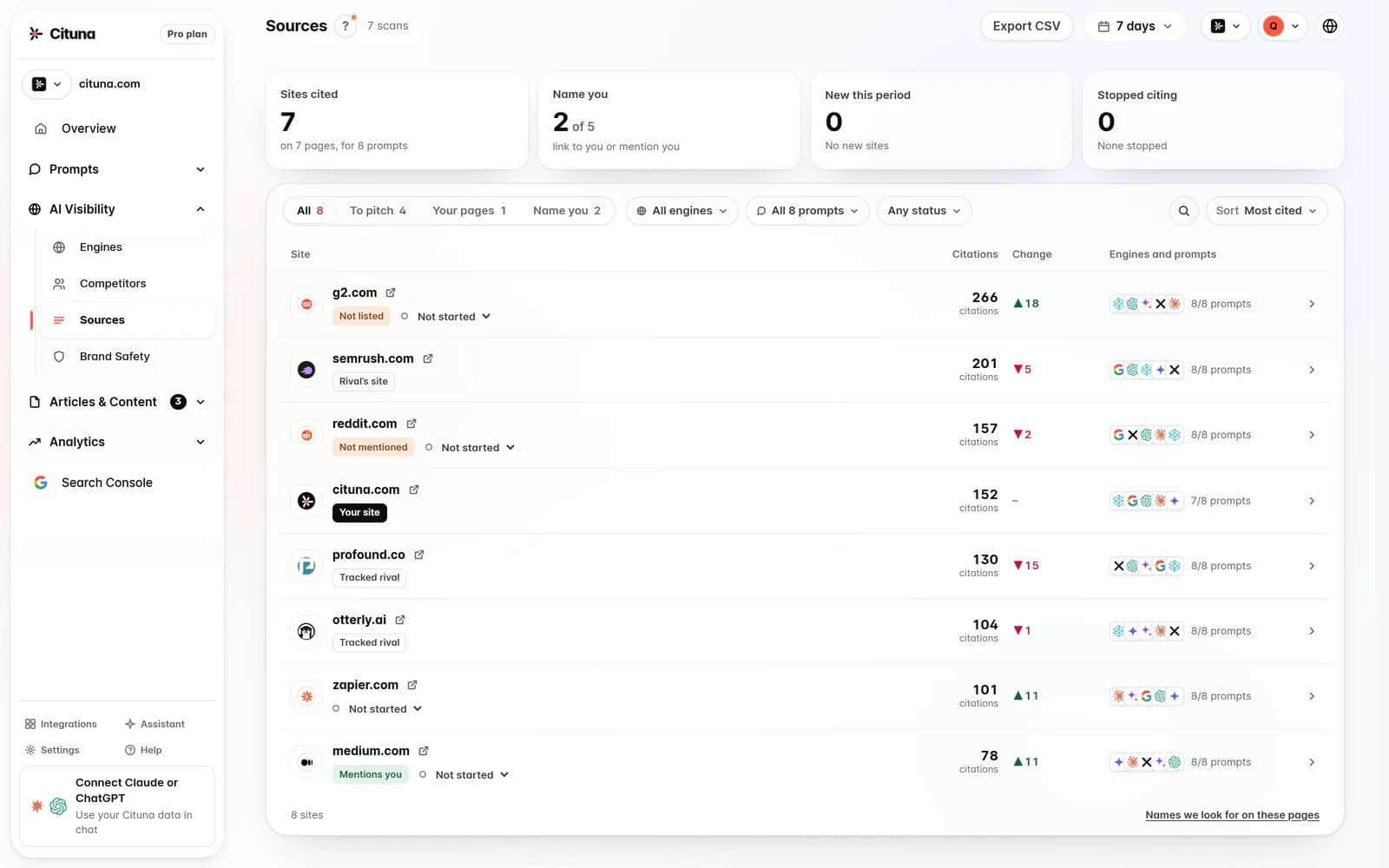
Google Search Console helps connect changes with clicks and search queries, while AI visibility tracking tests what named engines actually answer. Cituna includes Google Search Console and checks seven engines every day on every plan, recording the brand, cited pages, position, and competitors that appear instead. Its AI visibility measurement is therefore different from a backlink report: one shows incoming references, while the other shows answer-level inclusion.
A practical comparison uses three columns:
- Backlink evidence: who links, from where and to which URL.
- Search evidence: which queries lead to impressions and clicks.
- Answer evidence: which engine names or cites the brand, and which page appears instead.
Read Cituna's explanation of AI visibility measurement when the question is no longer “who links to us?” but “why does an answer engine cite another page?” The distinction prevents a team from buying or requesting links when the missing fix is a clearer answer, schema, FAQ markup or page revision.
6. Diagnose the gap instead of chasing a bigger link count
Diagnose the missing evidence before pursuing more backlinks. The most useful first change is usually the one that connects a real buyer question to a page that answers it directly and can be cited.
Use this decision rule:
- If the right page has relevant links but is not named, improve the answer, structure, entities and supporting evidence on that page.
- If the right page is strong but has no credible references, pursue relevant editorial links, partnerships or original data.
- If competitors' pages are cited instead, compare the exact claim, wording, page type and source context that their pages provide.
- If the report contains mostly irrelevant or duplicated links, clean the inventory before drawing conclusions.
Illustrative example: suppose a software company checks the question “which reporting tool suits a small marketing team?” The backlink report shows three industry articles linking to the company's home page, while a competitor's comparison page is cited by an answer engine. The company should create or revise a comparison page that answers the question, link to it from the relevant articles where appropriate, then rerun the same prompt and check whether the answer names or cites that page. The example is a method, not a claimed customer result.
Cituna generates proposed schema, FAQ markup, llms.txt and page changes for each recorded visibility gap, so the team can connect a missing answer to a specific fix rather than treating backlinks as the only lever.
7. Select a checker by the action it supports
Select a backlink checker by the decision it supports, not by a headline score. Google Search Console is useful for links Google has reported to a verified property, while dedicated tools such as Ahrefs, Moz, Serpstat, Similarweb, Linkody and SE Ranking are designed for broader backlink research. Their coverage, filters and export limits can differ, so compare the fields you actually need.
Choose a conventional checker when the task is link discovery, competitor research or outreach. Choose Cituna when the task includes testing buyer questions across ChatGPT, Perplexity, Gemini, Claude, Grok, Google AI Overviews and Google AI Mode, then moving from a missing mention to a content or technical fix. Cituna's AutoSEO can write articles from recorded gaps and Search Console demand and publish them to a connected CMS by webhook, with approval or automatic publication.
Use a free backlink checker for an initial inventory if it provides enough source URLs to inspect. Do not confuse a free crawl-readiness check with free brand mention or citation tracking. Cituna's free visibility check tests crawler readiness; brand mention and citation tracking require an account plan.
For a team comparing options, keep the evaluation grounded in the next action:
- Need source URLs and link context: use a backlink checker.
- Need Google query and click evidence: use Search Console.
- Need answer-level brand and citation evidence across seven engines: use Cituna.
- Need a fix and publication workflow after the gap is known: use the platform that generates and routes the change.
8. Rerun the same checks and record what changed
Rerun the same domain, URLs and buyer questions after each meaningful change, and record the result beside the original baseline. Consistent inputs make it easier to separate a useful page revision from a coincidental change in a link report or answer.
Keep a change log with the source or target URL, action taken, date, expected effect and observed result. For backlinks, check whether the relevant source still links to the intended page and whether redirects or removals changed the target. For AI visibility, check each of the seven named engines separately because one answer can cite a page that another does not.
A practical next step is to run Cituna's free AI visibility scan to establish crawler readiness, then prepare the buyer questions, target pages and backlink export for a proper visibility review. Cituna can connect the recorded gap to generated fixes, Search Console demand and CMS publication, while the backlink checker remains the evidence for who links to the site.
The goal is not the largest backlink list. The goal is a defensible chain from buyer question, to relevant source, to useful page, to an answer that names or cites the brand.
Related reading
- Perplexity Rank Tracker: Track Your Brand
- Grok Rank Tracker: track your brand in xAI’s Grok
- Claude Rank Tracker: Track Your Brand
- Incoming Links Checker: Steps and Next Actions
Official sources to check
Drafted with AI assistance from our own research and Search Console data, and reviewed by Rahul A before publishing. Rules and prices change; check the linked official source before you act.

